Interface guide
Institutional execution has one hard problem: moving size without signalling it to the market. The Cocoon dark pool is built around that problem — confidential intent, anonymous crossing at a reference price, atomic settlement, and compliance kept auditable rather than absent.
This is a visual tour that follows a trader from sign-in through a confidential order, then tours the operator and infrastructure surfaces.
Terms like DBC bearer coins, Pedersen commitments, and DVP settlement are introduced on the Dark Pools overview — start there if any are unfamiliar, then come back.
A single-pool P1 (reference-price cross) dark pool runs today — that is the path this guide walks end to end. The interface also previews the periodic-auction (P2) and negotiated-RFQ (P3) order forms and the multi-pool topology; those belong to the forward design and are shown here to indicate where the product is headed. Where a screen is forward-looking, it is called out inline.
The shell: role-gated navigation
Every screen sits inside the same shell. The top-left shows the Cocoon Dark-Pool wordmark, the current role badge, and a navigation bar whose links depend on that role. The top-right shows the active pool and the sign-out control.
The nav is gated by role, so two people see two different apps:
| Role badge | Lands on | Navigation visible |
|---|---|---|
| Trader | Trading | Trading · DEX Flow · Explorer · + Join pool |
| Operator | Operator | Operator · Topology · DEX Flow · Explorer · + Join pool |
| Pool / Chain Compliance | Operator | Operator |
| Oracle | DEX Flow | DEX Flow |
| KYC Issuer | Trading | Trading |
The rest of this guide is from the Trader seat, then visits the operator-only surfaces at the end.
Trust boundaries at a glance
Before the screens, the one table an execution or risk desk needs: what is visible, to whom. All of this is enforced by the protocol, not by operator goodwill.
| What | Public & other traders | Pool operator | Compliance officer (scoped, on authorized request) |
|---|---|---|---|
| Order price | Hidden | No trader-set price exists — the clearing price comes from the oracle | Visible |
| Order size, side | Visible on chain in v1 (cleartext; committed in the production design) | Visible | Visible |
| Trader identity | Hidden | Pseudonymous pool-scoped address only | Visible |
| Matching hint (side + bucketed band/size) | Hidden | Visible (ECDH-encrypted to the operator, for matching) | Visible |
| That an order was placed (the commitment) | Visible | Visible | Visible |
| Mint / melt bridge events | Visible | Visible | Visible |
And what the venue cannot do to a trader:
- The operator cannot choose a trader's price: orders carry no trader-set price, matching runs deterministically on chain, and the clearing price comes from an oracle reference. It cannot move trader funds and cannot identify a trader beyond a pool-scoped address. It can, however, change which oracle a pool reads (
setDexOracle), so it is not powerless over the clearing price. - In the v1 proof-of-concept order size and side are stored in cleartext on chain and can be read by anyone with chain access. Only the amount commitment is Pedersen-hidden. Committing size and side so no participant can read them is the production goal, not current behaviour.
- The matcher pairs orders on volume alone — it never sees price, so it cannot favor a counterparty or extract MEV.
- The price oracle only supplies the reference price; it touches no orders and no funds.
- Settlement is atomic (DVP): both legs clear together or neither does — there is no half-settled state, and no counterparty risk.
- Funds are non-custodial — the trader holds the spend keys; the pool coordinates, it does not take custody.
- Compliance visibility is selective disclosure, not a backdoor — scoped, party-to-party, and itself recorded in the audit log.
1. Signing in
The login screen presents two sign-in methods — dev personas and wallet connection.
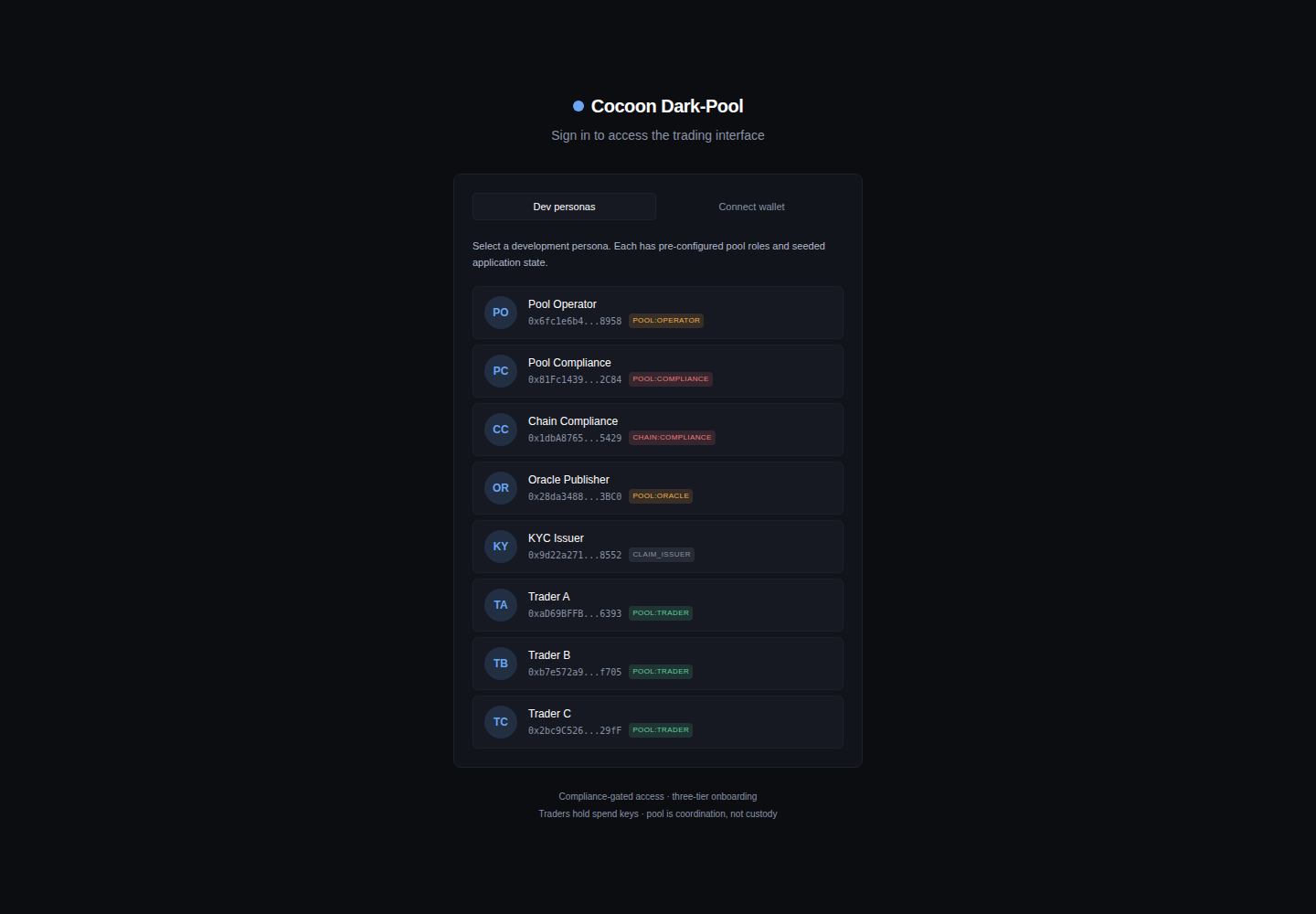
Dev personas (above) is the fast path for demos: eight pre-funded accounts, each with a fixed role and address — Pool Operator, Pool Compliance, Chain Compliance, Oracle Publisher, KYC Issuer, and Traders A / B / C. Selecting one signs in as that identity. This makes a two-party trade easy to show: one browser as Trader A, another as Trader B.
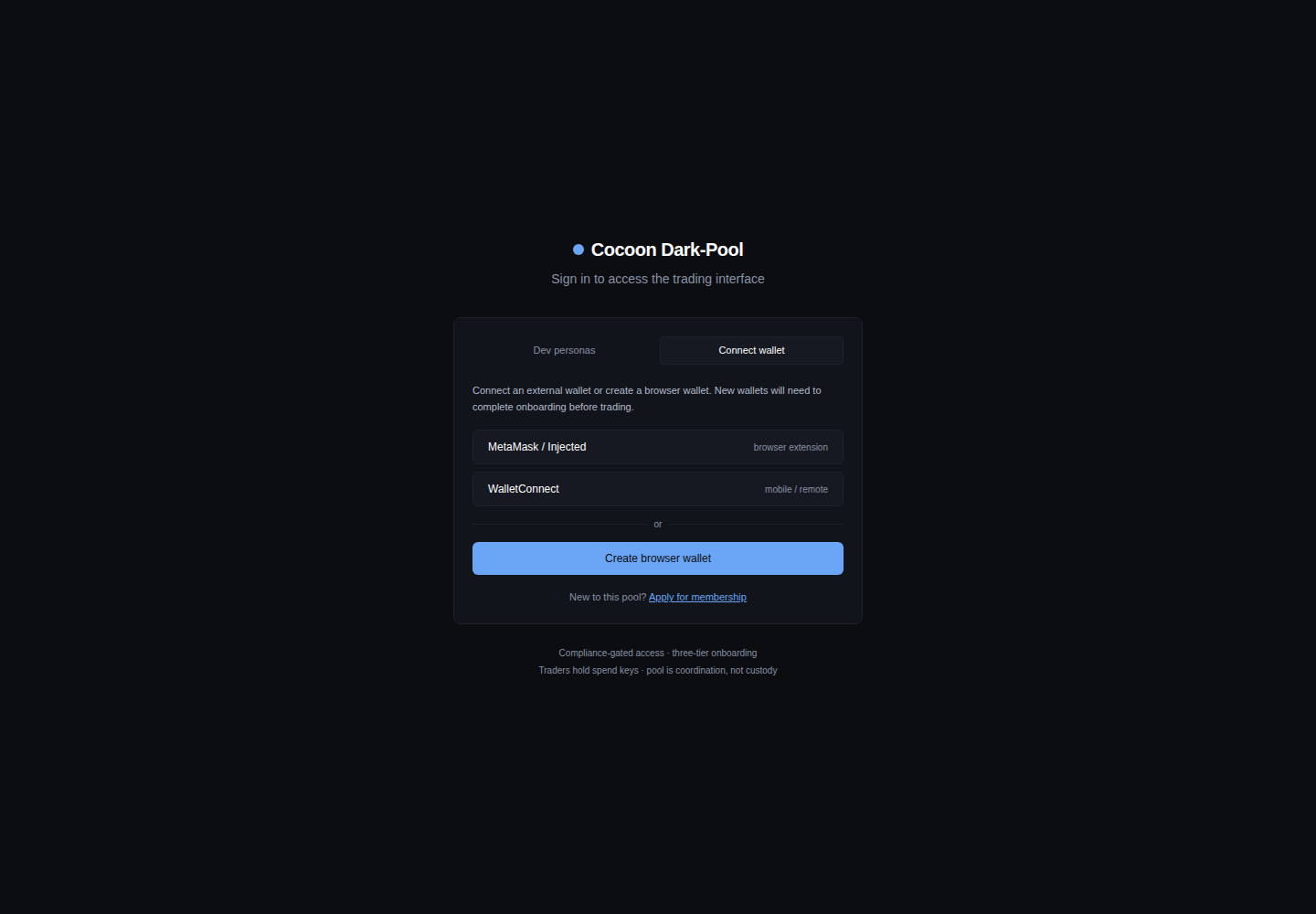
Connect wallet is the realistic path: connect an external wallet (injected / MetaMask, WalletConnect, or a throwaway browser wallet). A wallet with no on-chain credential is sent through onboarding before it can trade.
2. Onboarding into a pool
A wallet without a verified credential cannot place orders. The + Join pool flow walks it through a six-step onboarding wizard, with the pool's parameters and the trader process shown alongside.
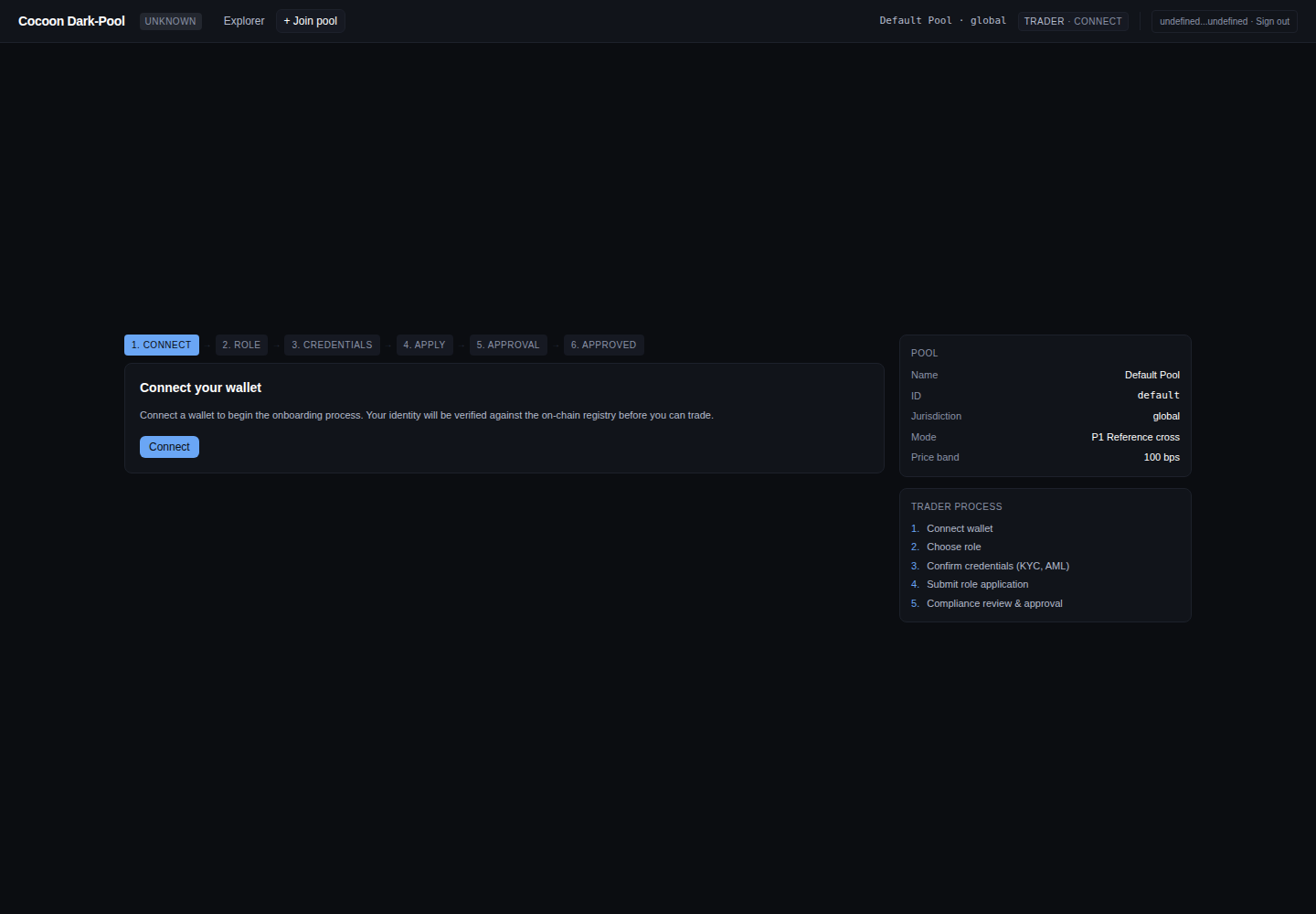
The steps — Connect → Role → Credentials → Apply → Approval → Approved — register an on-chain identity and request membership. Credentials (KYC / AML claims, jurisdiction) are issued under the ERC-3643 permissioned-token standard and verified by the identity layer; a compliance officer reviews and approves the application before the wallet gains trader access. The sidebar shows the pool being joined (here: Default Pool, jurisdiction global, mode P1 reference cross, price band 100 bps).
Applying records an application in the onboarding registry (ApplicationSubmitted); a compliance officer clears it (ComplianceCleared) — or rejects it with a reason (ComplianceRejected) — and the wallet's claims are registered as ERC-3643 identity claims. Only a finalized application grants the on-chain trader role, which the pool's onlyTrader checks enforce before any commitOrder can succeed.
The seeded Trader A / B / C personas are already enrolled, so signing in as one lands straight on the trading screen — onboarding only runs for a fresh wallet.
3. The trading screen
This is the trader's home. It is a single composite view — there is deliberately no public order book. The trader sees only their own assets and order lifecycle, nothing about anyone else's. To anyone who has worked an execution-management blotter (Bloomberg EMSX and the like), the layout is familiar — orders, fills, and settlement in one place — with one deliberate omission: there is no market-depth panel to leak, or be leaked to.
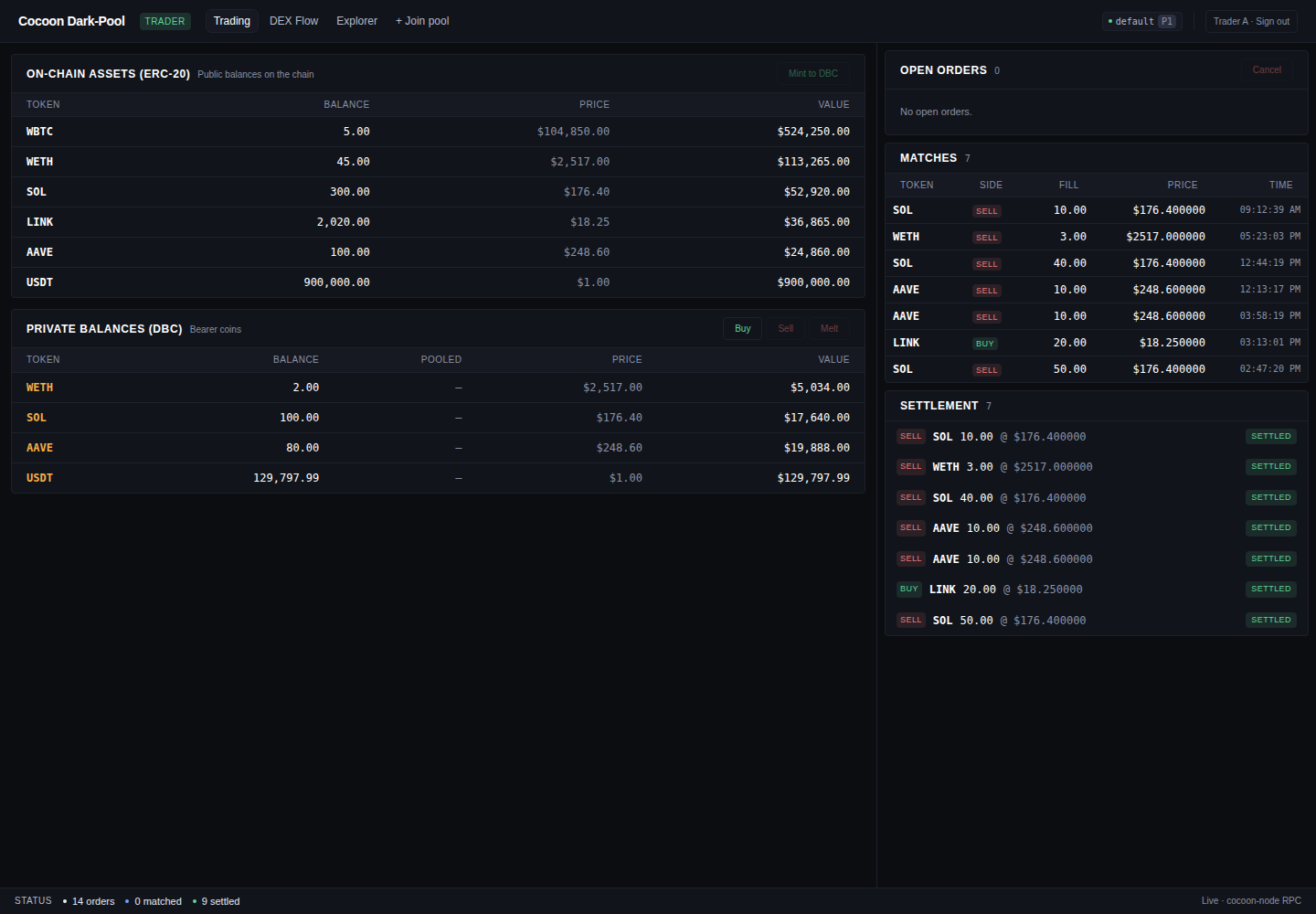
- On-chain assets (ERC-20) — the trader's public, transparent balances (WBTC, WETH, SOL, LINK, AAVE, USDT) with live prices. The Mint to DBC action lives here.
- Private balances (DBC) — the trader's bearer coins, whose amounts and holder are hidden on the L2. Buy, Sell, and Melt act on these.
- Open orders — the trader's resting commitments, with a Cancel control. Empty until an order is placed.
- Matches — fills as they happen: token, side, fill quantity, clearing price, time.
- Settlement — each settled leg, marked
SETTLED.
The status bar at the bottom reports live pool-wide counters (orders / matched / settled) and confirms the UI is reading from a live cocoon-node RPC.
None of this is off-chain bookkeeping. The composite view is reconstructed from chain state and event logs — the trader's orders from the pool's order reads, and the OrderCommitted → MatchFound → MatchSettled event stream for the lifecycle — so what is shown is what the chain says, independently verifiable.
4. Bringing assets in and placing an order
Mint to DBC
Trading an asset confidentially starts by converting it into a DBC bearer coin. Select an ERC-20 row and click Mint to DBC:
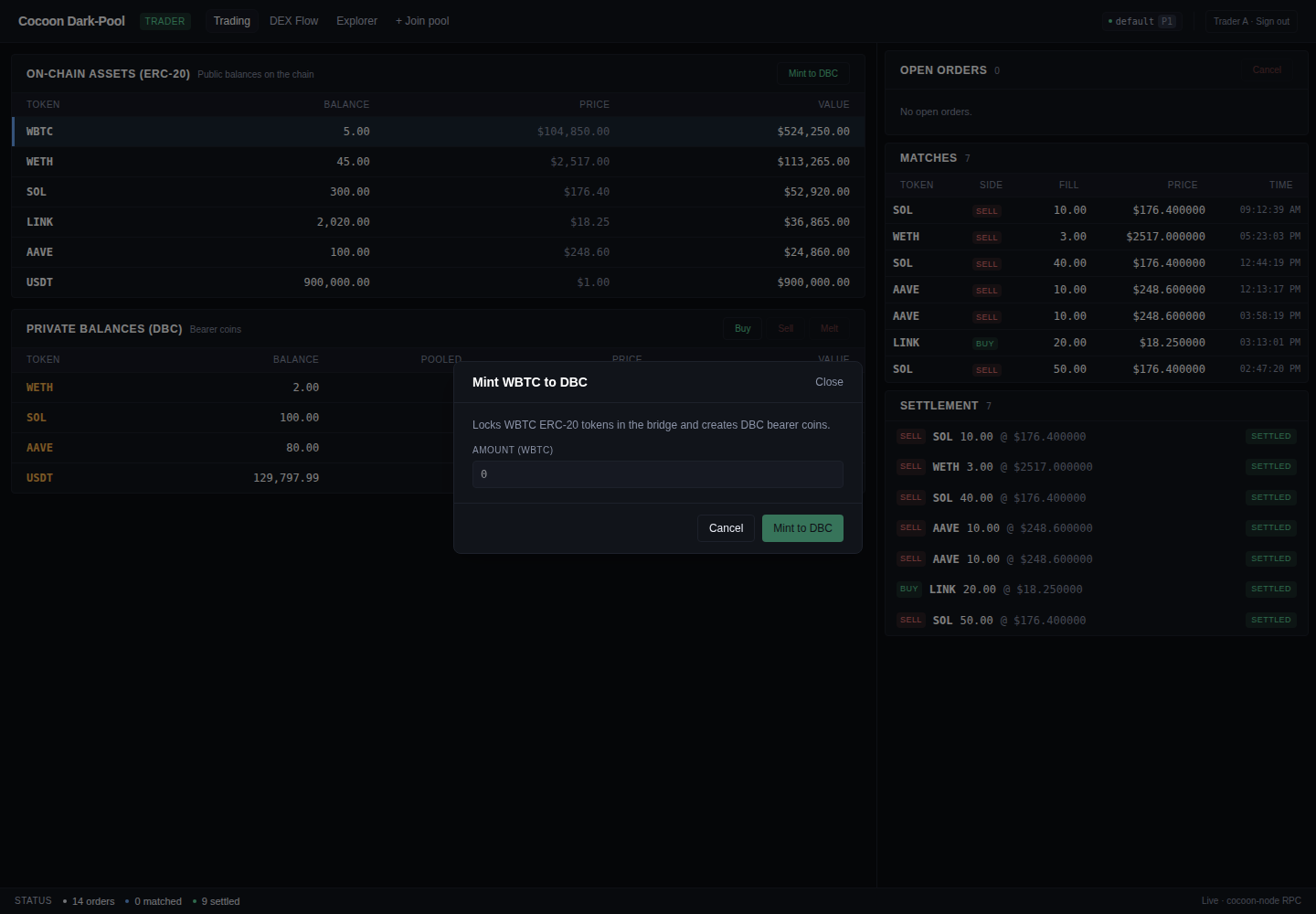
The modal locks the chosen ERC-20 in the bridge and mints an equal amount of private DBC into the trader's wallet. It takes about one block (~2s); the amount moves from On-chain assets into Private balances.
Minting is two transactions: an ERC-20 approve to the DBCBridge, then DBCBridge.mint(token, amount), which escrows the public tokens and issues a DBC bearer coin (returning a mintId). Melt is the inverse — melt(mintId, amount, recipient) burns the coin and releases the ERC-20. A compliance check gates both.
Minting and melting are not private — they are visible bridge events. Privacy lives in what happens between them: the committed order and the dark match.
The order form
Choosing Buy or Sell opens the order builder. It is laid out as a numbered checklist on the left, with a live privacy disclosure panel on the right that is honest about exactly what leaks and to whom. The three pricing modes are tabs across the top.
P1 — Reference-price cross (the path that runs today)
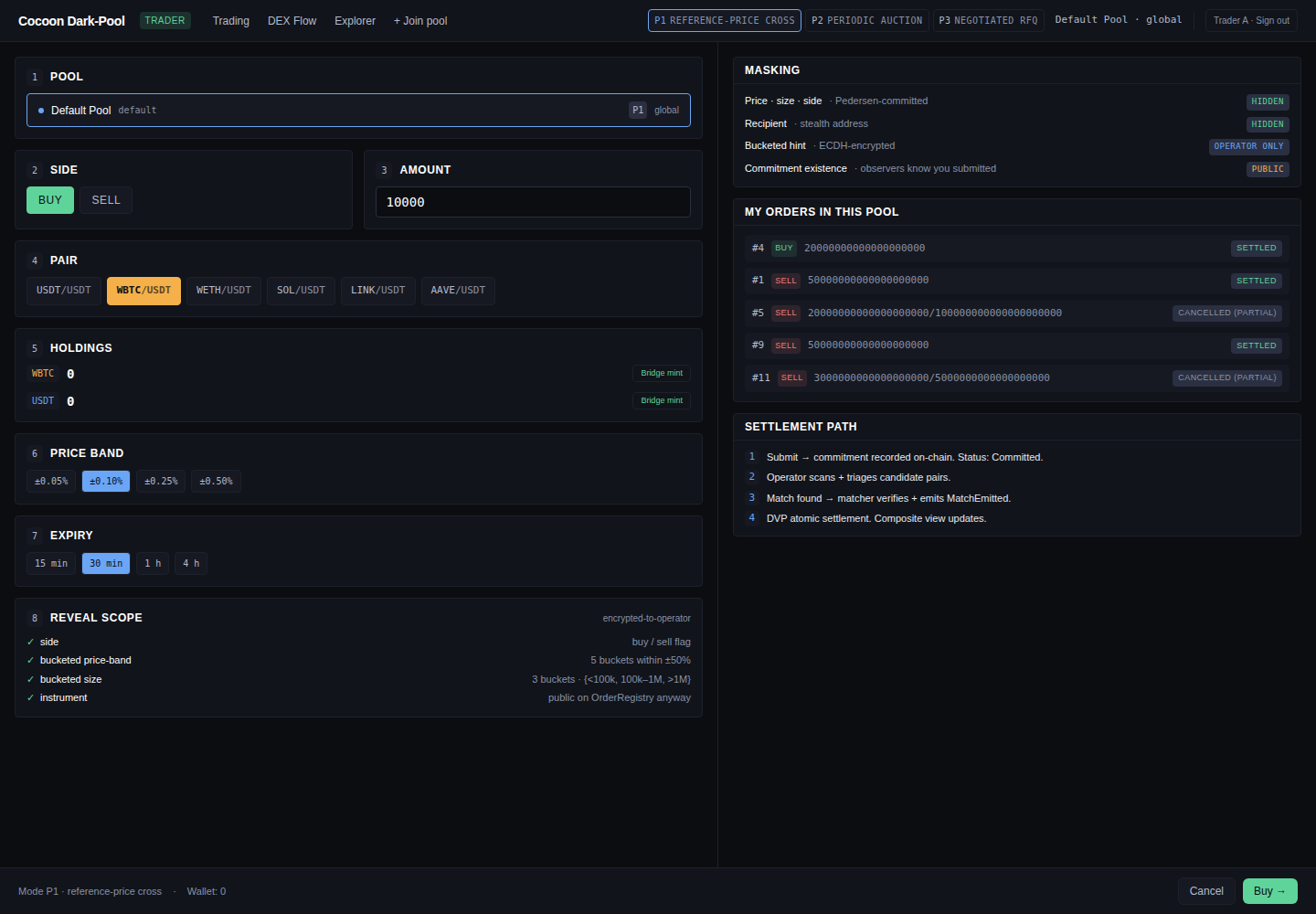
The form captures side, amount, pair, a price band (± bps allowed from the oracle reference, e.g. ±0.10%), an expiry, and a reveal scope. The Masking panel makes the privacy properties explicit:
- Price —
NONE(no trader-set price; the oracle sets the clearing price) - Size · side —
CLEARTEXTon chain in v1 (the amount commitment is stored alongside; committing these is the production goal) - Recipient —
HIDDEN(stealth address) - Bucketed hint —
OPERATOR ONLY(ECDH-encrypted to the operator for matching) - Commitment existence —
PUBLIC(observers can see that an order was submitted, never what)
The Settlement path panel previews the four stages an order moves through: submit → commitment recorded on-chain; operator scans and triages candidates; match found → matcher verifies and emits the match event; DVP atomic settlement.
Read the form as guarantees, not just inputs: an order can never fill outside its price band; it auto-expires at the chosen horizon rather than resting stale and signalling; and an unmatched commitment can be cancelled at any time, returning the reserved amount to the wallet. The committed amount is reserved to the pool on submission — so any match is guaranteed to be settleable.
Submitting calls DarkPool.commitOrder(…), which records the order with its Pedersen commitment and a stealth recipient and emits OrderCommitted. The order rests with status Committed and its reserved DBC stays with the pool contract until it matches, is cancelled (cancelOrder → OrderCancelled), or expires. Matching then runs automatically — see the next section.
P2 — Periodic auction (forward design)
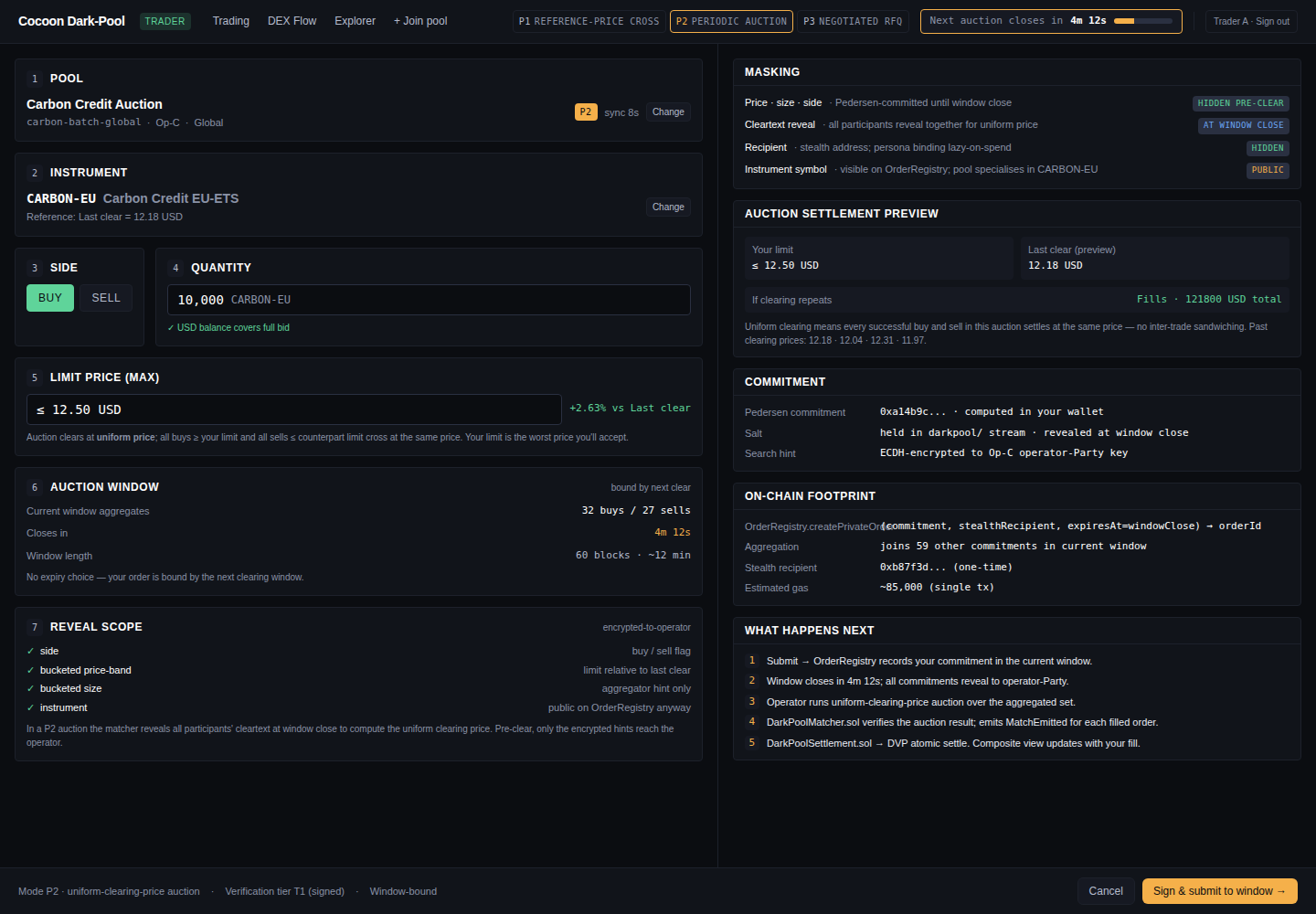
The auction form drops the price band in favor of a limit price (max) and an auction-window countdown. Orders submitted before the window closes clear together at a single uniform price — no intra-batch ordering advantage. Shown here on a Carbon Credit Auction pool.
P3 — Negotiated RFQ (forward design)
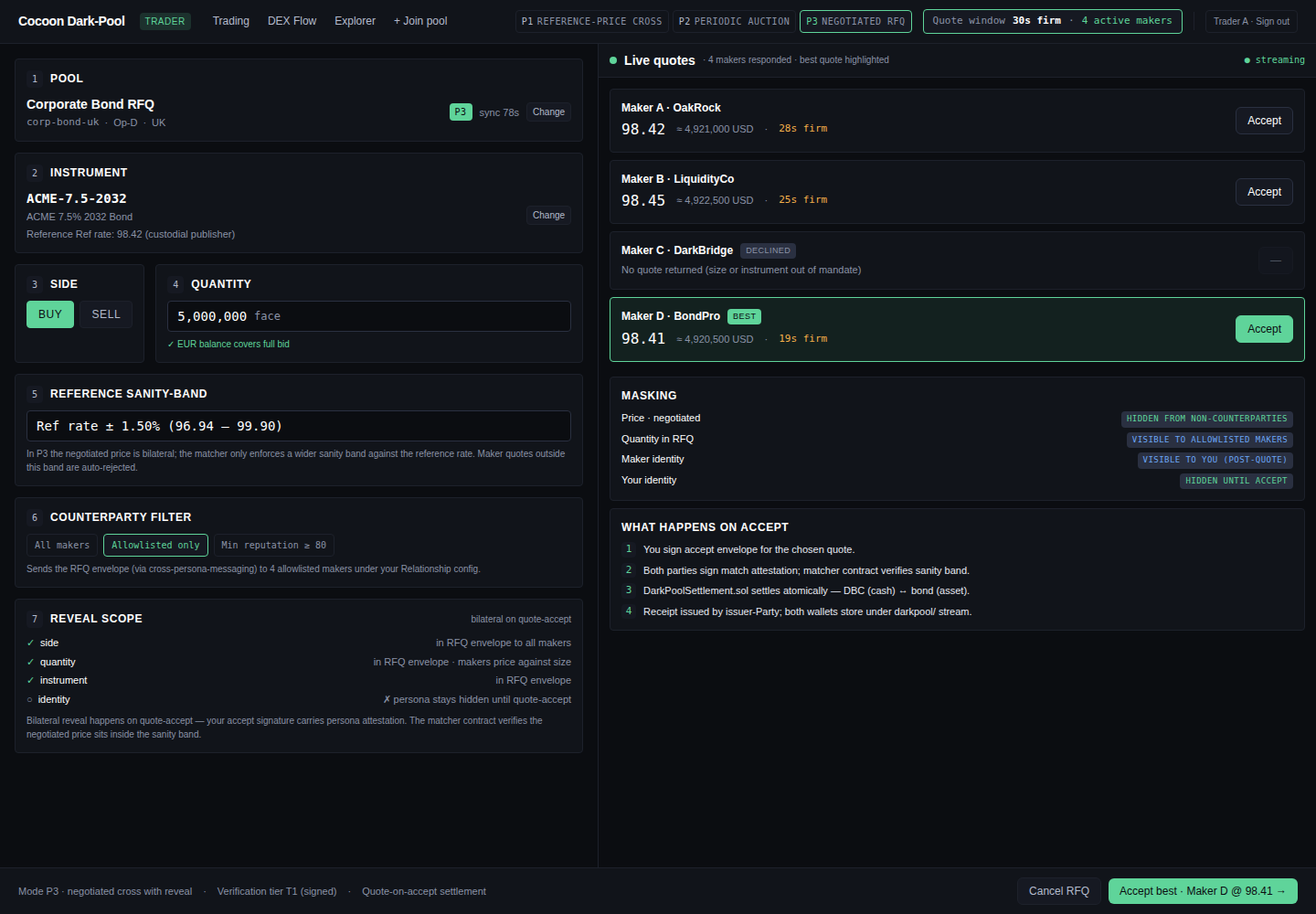
The RFQ form is quantity-only — a quote request returns a live leaderboard of maker firm-quotes, each with its own validity timer and an Accept button. It is the on-chain analog of an RFQ desk (Hashflow-style firm quotes): there is no slippage slider, because a firm quote is firm. Shown here on a Corporate Bond RFQ pool, with a reference sanity band and a counterparty filter.
5. Matching and settlement
Once a counterparty's opposite-side order arrives, the matcher pairs the two on a first-in-first-out, volume-only basis (it never sees price). The matched pair is stamped with a block reference and handed to the settler, which samples the oracle price at that block and executes a two-leg delivery-versus-payment swap. End to end this is roughly 7–9 seconds on the 2-second-block demo chain.
Matching runs automatically after every new order and on each oracle price update: the pool's matching routine crosses eligible buys and sells FIFO at the DEX oracle's reference price, bounded by the pool's price band, and emits MatchFound carrying a match proof bound to the block number. Each side then calls submitSettlement(matchId); once both legs are in, the settler computes the payment as fill × clearing price and emits MatchSettled, moving the token and cash legs in one atomic step. If a leg is not submitted within the settlement window (~50 blocks), expireSettlement emits SettlementExpired and the match is voided — no funds move.
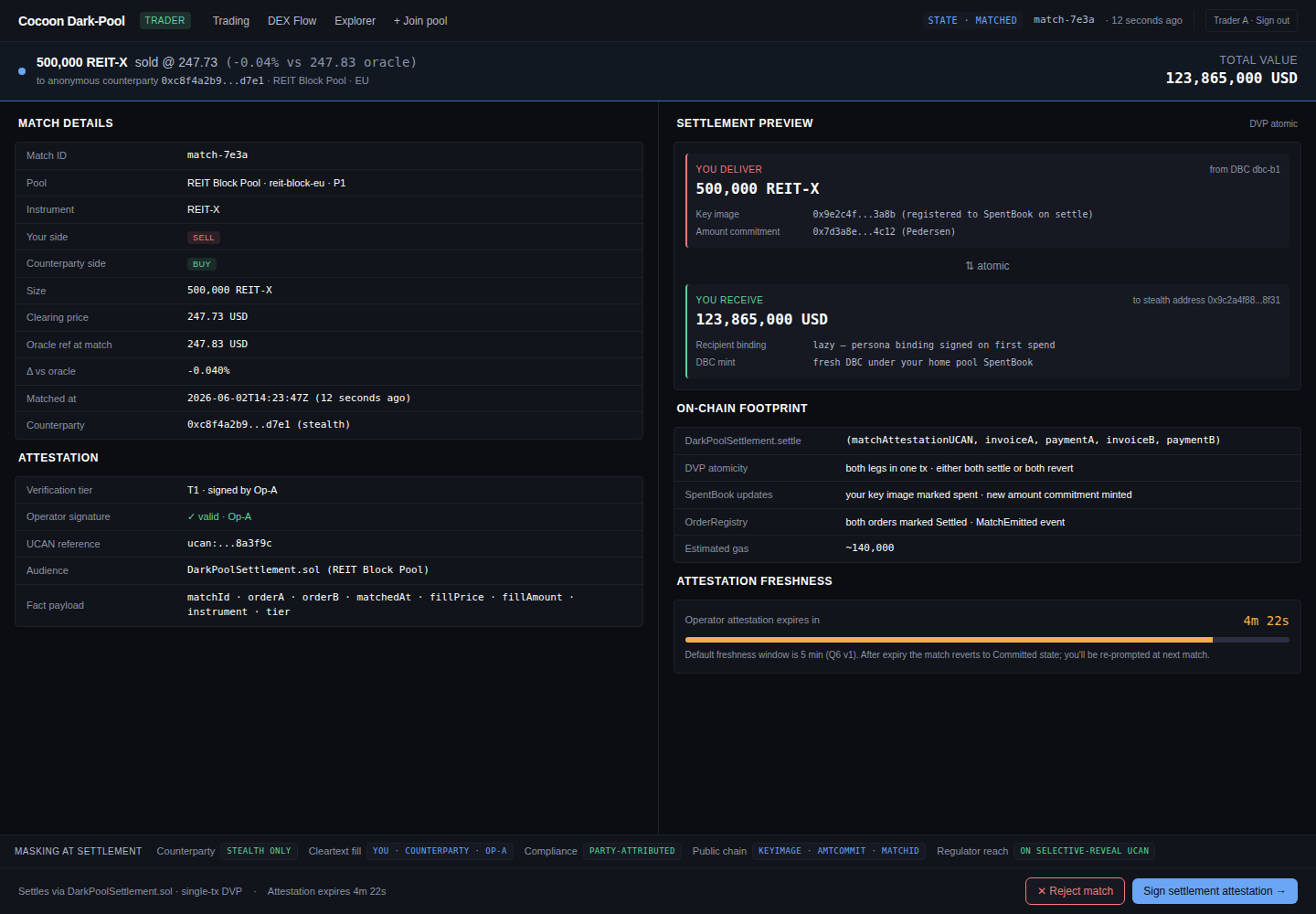
The match detail surfaces the cleared terms, a settlement preview, the matcher attestation and its freshness window, and the on-chain footprint of the settlement. Back on the trading screen, the Matches and Settlement panels populate and both wallets' private balances update atomically — asset to the buyer, DBC cash to the seller.
When a trade is partial — or doesn't happen
Institutional desks need certainty about every outcome — not just a clean fill — so the UI makes each case explicit:
- Partial fill — normal. An order for 40 may fill 20 now and leave 20 resting; the remainder keeps its place until a counterparty arrives or it expires.
- Cancel — an unmatched commitment can be cancelled from Open orders, and the reserved capacity returns to the wallet.
- All-or-nothing settlement — the DVP swap settles both legs or neither. There is no state in which one side has paid and not received, so a failed leg cannot leave a trader exposed.
- Screening at the door — a participant who fails compliance never reaches the order book in the first place; access is gated at onboarding, not unwound mid-trade.
Every order moves through the same on-chain status machine — these are the literal OrderStatus values the contract records:
A partial fill settles the matched portion and leaves the remainder resting in Committed, free to match again or be cancelled.
To take proceeds back as a public ERC-20, Melt bridges the DBC back to the chain.
6. The operator and infrastructure surfaces
These screens are reached with the operator, oracle, and compliance roles. Traders never see the operator console; what follows is a read-only tour.
Operator console
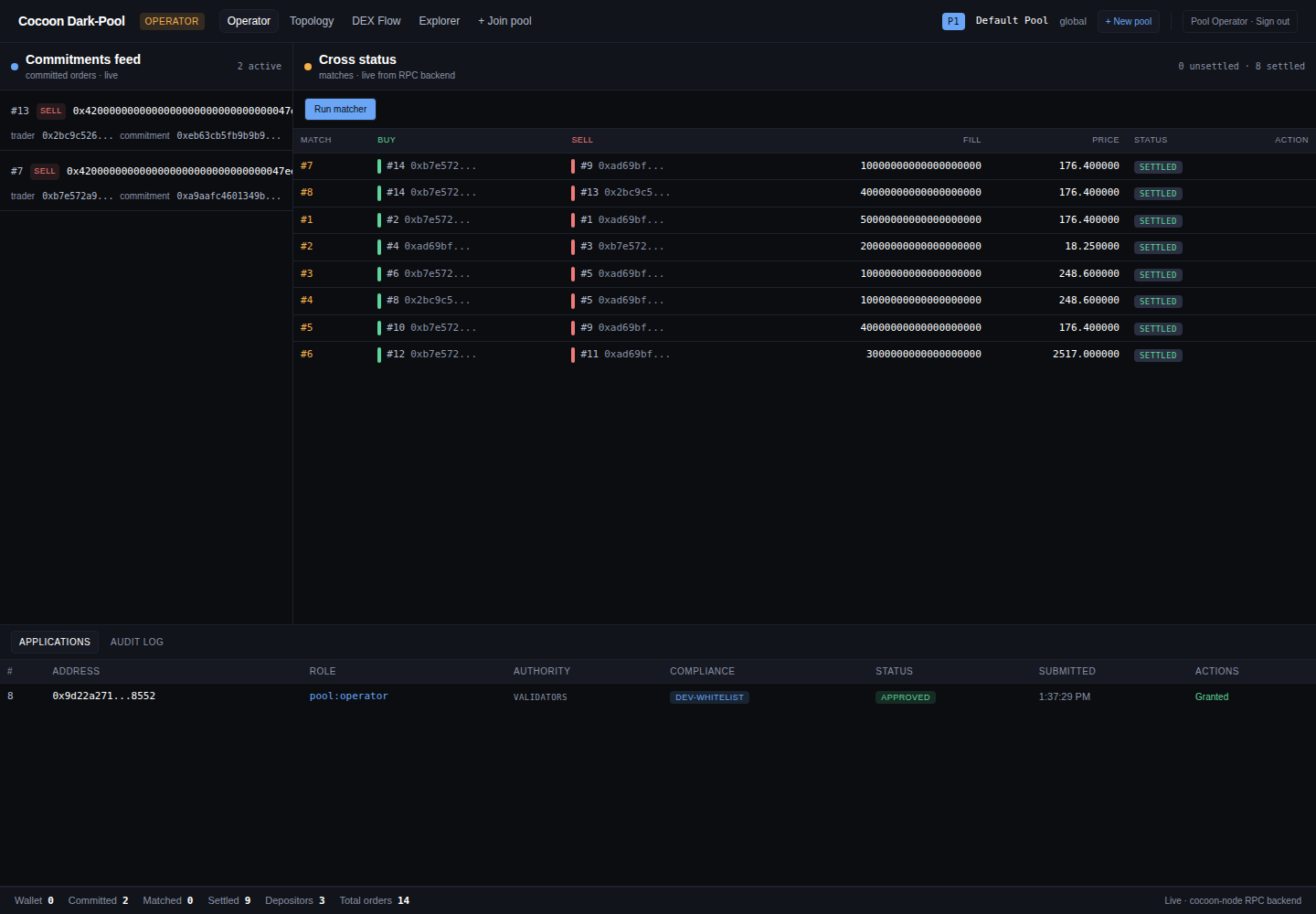
The operator works a three-pane console — the institutional analog of a crossing-engine operator's desk: a live commitments feed (committed orders arriving, with trader address and commitment hash), a cross-status table of matches with a Run matcher control, and a bottom pane that toggles between Applications (membership requests with role, authority, compliance whitelist, and approval status) and an Audit log. Crucially, the operator sees commitments and match outcomes but not order prices, sizes, or sides, and cannot move trader funds.
The commitments feed and cross-status table are live renderings of the OrderCommitted and MatchFound / MatchSettled event streams; Run matcher submits the matching transaction; and the Applications pane reads the onboarding registry. The audit log is the on-chain event history itself — not a separate, mutable record.
Compliance review and selective disclosure
This is the surface that lets an institution's legal and compliance team say yes. Membership is gated: every applicant's KYC / AML claims and jurisdiction are reviewed and approved — in the console's Applications pane — before the wallet can trade, and every privileged action is written to an immutable Audit log.
Past the door, visibility is selective disclosure, not a backdoor. Order details stay hidden from the operator and the market, but a compliance officer — or, on an authorized request, a regulator — can obtain a scoped, party-to-party reveal of a specific participant's identity and compliance status, without leaking anything to other traders, and with the reveal itself recorded. The institution deploying the pool sets the policy: mandate KYC / KYB for a restricted desk, or relax it for a permissionless venue. This is the line between this design and an anonymity mixer — privacy for the market, accountability for the regulator.
DEX flow
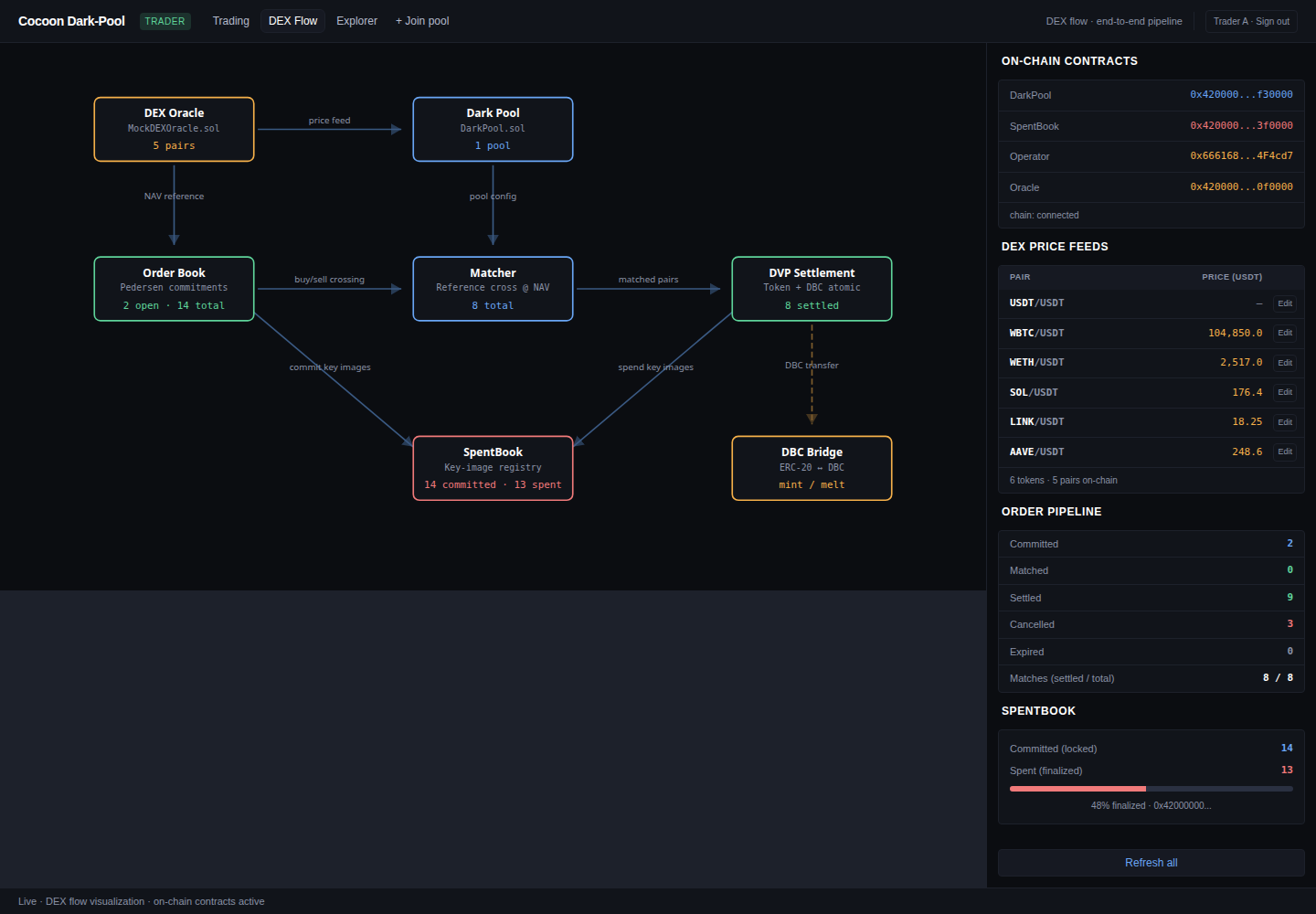
The DEX-flow view is a live, end-to-end diagram of the running system: the DEX oracle feeds the dark pool; the order book crosses into the matcher; matched pairs flow to DVP settlement; the SpentBook tracks key images and the DBC bridge handles mint/melt. The side panels show the deployed contract addresses, the live price feeds, the order pipeline counts (committed / matched / settled / cancelled / expired), and the SpentBook commit-vs-spend progress. This is the clearest single picture of how the pieces fit together — and the addresses shown are the live, genesis-deployed contracts the rest of this guide has been calling.
Topology (forward design)
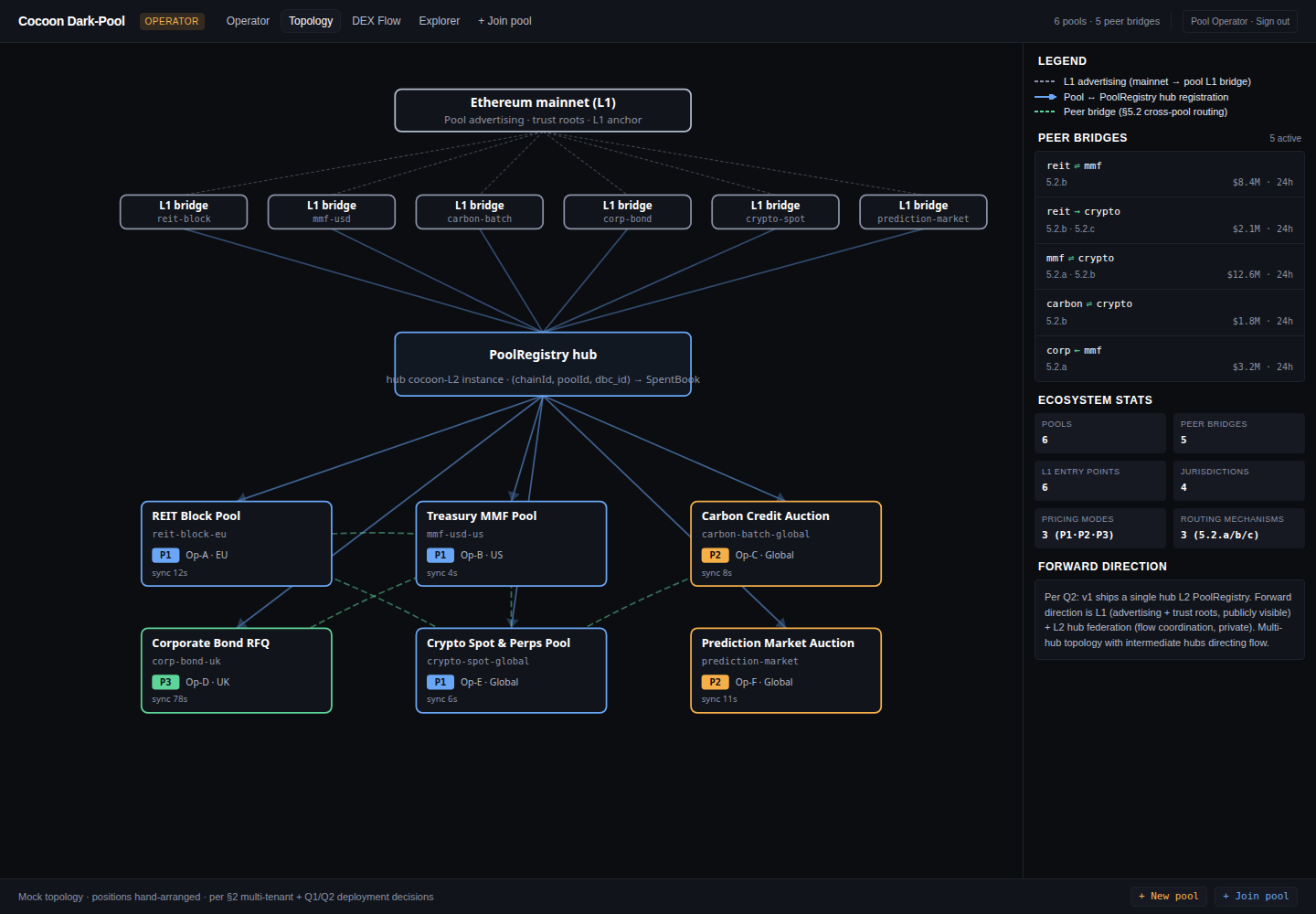
The topology view sketches the forward design: an L1 anchor, cross-layer bridges, a shared liquidity hub, and several specialized pools (REIT block, treasury MMF, carbon-credit auction, corporate-bond RFQ, crypto spot & perps, prediction-market auction). The running PoC is the single Default Pool; this diagram shows the multi-pool layer it generalizes into.
A block / transaction Explorer is also wired into the nav for inspecting on-chain activity directly. It is omitted from this guide because its feed depends on the chain backend and does not always populate on the shared demo instance.
Where to go next
- Security model — what the architecture removes by construction, and the proof-of-concept status.
- FAQ — front-running, compliance, counterparties, settlement, execution price, latency, and what runs today.
- Using the dark pool — the same flow as a short text walkthrough.
- Technical spec — the order / match / settlement architecture behind these screens.
- Product spec — vision, target users, and the staged roadmap that the P2 / P3 and topology surfaces preview.